Listing photography
AI Real Estate Photos and MLS Rules: A Guide to Clear Disclosures
A practical U.S. guide to responsible AI real estate photo editing, virtual staging disclosures, disclaimer watermarks, original photos, and checking your MLS requirements.
picAid · Published · 6 min read
Can real estate agents use AI-edited listing photos?
AI photo editing and virtual staging can help explain a property, but whether an image is acceptable depends on the actual changes and the rules that apply to the listing. Across the United States, agents should check their MLS requirements, brokerage policies, applicable laws, and photo permissions before uploading edited images.
The responsible approach is simple: represent the property accurately, identify meaningful digital changes, retain the originals, and review every result. A disclosure helps explain an image, but it does not make an otherwise prohibited or misleading edit acceptable.
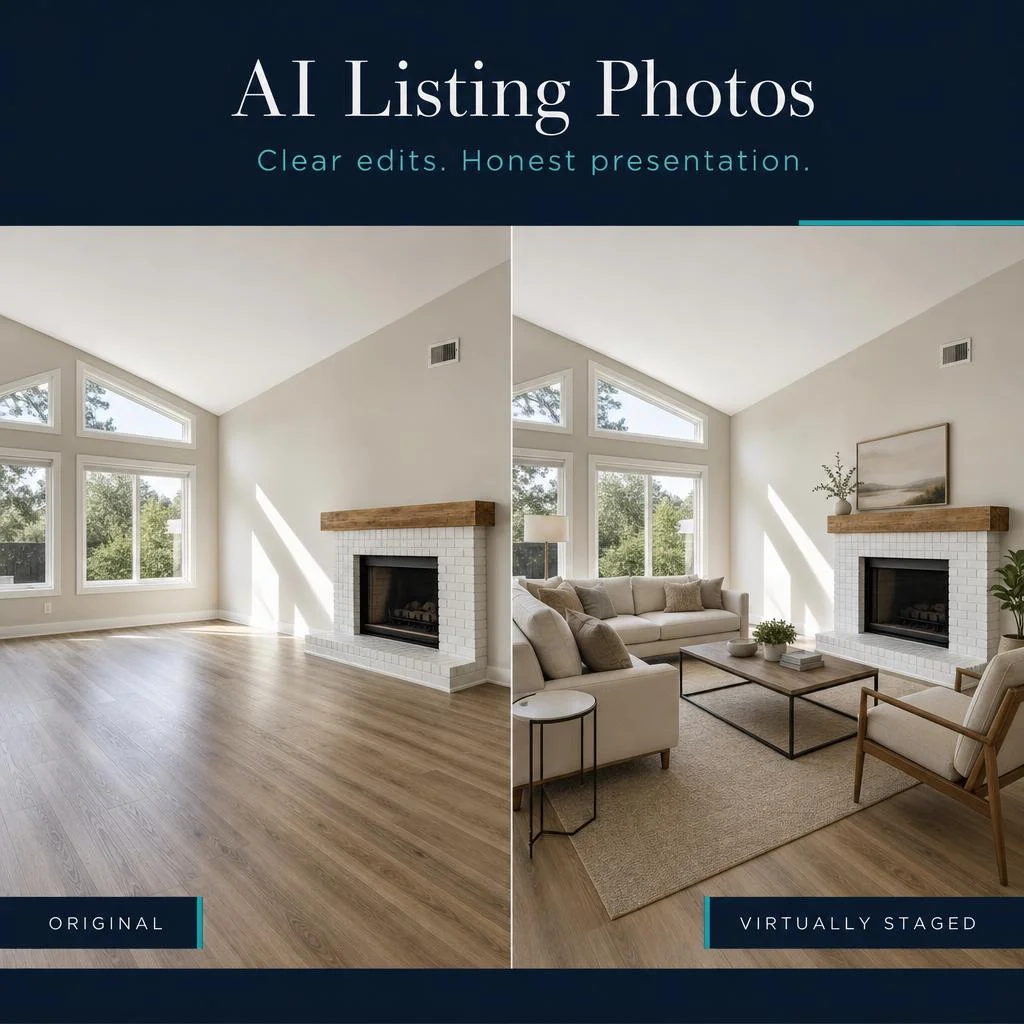
The accompanying graphic is an AI-generated illustration of the empty-room and furnished-room concept, not a customer listing, a documented before-and-after edit, or evidence of a particular result.
Changing listing controls do not change the need for accurate photos
Listing platforms and MLS organizations continue to adjust how property information is distributed and displayed. Depending on the service, sellers and agents may have choices about public photo visibility or the display of certain listing details. Separately, photo policies may address virtual staging, digital alterations, and how those changes must be disclosed.
These are different issues. A privacy setting controls who can see information. A photo disclosure explains how an image was changed. Neither should be treated as permission to conceal a property's condition or present an improvement that does not exist.
There is no single nationwide MLS photo rulebook. Before changing your workflow, verify the current policy for the service receiving the listing rather than relying on what another agent or another platform allows.
Distinguish photo corrections from changes to the property
Careful exposure and white-balance corrections can help a photograph look closer to the room as experienced in person. Virtual staging serves a different purpose: it illustrates how movable furniture and decor might fit in an existing space.
Removing a wall, adding a window, disguising damage, changing a permanent finish, or replacing the view can create a materially different impression. Do not assume these changes are permitted because an editing tool can produce them.
Ask: would a buyer arrive at the showing expecting a feature or condition that is not actually there? If so, reconsider the edit and check the applicable requirements. Even an ordinary brightness adjustment should not hide defects or misrepresent a room.
Label virtually staged and materially altered images clearly
Use straightforward wording that describes the change. Depending on your MLS requirements, disclosure may belong on the photo itself, in its caption, in listing remarks, or in more than one place. Do not assume that one general statement covers every altered image.
For an empty room furnished digitally, a useful label is: "Virtually staged. Furniture and decor digitally added." Use a different description when the actual edits are different. A generic "AI enhanced" label may not explain a substantial alteration clearly enough.
A conceptual renovation image is not the same as a virtually furnished room. Some listing services do not permit depictions of unbuilt improvements, even with a disclaimer. Verify permission before using those images in a listing.
Use picAid's disclaimer watermark as part of your workflow
In picAid, open Settings from the menu to access your watermark options. Select an appropriate disclaimer watermark for the type of editing you are presenting, then inspect the final downloaded image to confirm the disclosure is visible and readable.
A visible label can help the disclosure stay with the image when it is viewed separately from listing remarks. Still, verify the required wording, placement, and any restrictions on text overlays with your MLS and brokerage.
A disclaimer watermark is a communication tool, not an MLS approval, legal certification, or substitute for reviewing the photo. If the image itself misrepresents the property, adding a label does not solve that problem.
Include the actual original photograph from the same angle
Keep the original camera file. Where allowed, a helpful gallery arrangement is to show the original view immediately before or after the virtually staged version, clearly distinguishing the two.
For an empty bedroom, buyers can first see the actual empty room and then a possible furniture arrangement. For multiple staged angles, pair each view with its corresponding original so the relationship is easy to understand.
Some policies require an unaltered original rather than merely a second version without furniture. Do not assume that a separately AI-edited or retouched image meets that requirement. Check the policy's definition and retain the untouched source.
Explain why digitally staged photos are included
When it accurately describes the work, this statement provides a useful starting point for captions or remarks:
"Selected photos have been virtually staged to illustrate possible furniture placement and room use. Furniture and decor shown in those images are digitally added and are not included with the property. Corresponding original photos show the rooms' actual condition."
Only use that statement when corresponding originals are included and the edit is limited to what the statement describes. Adapt it to the listing and required wording. It does not replace individual image labels or other disclosures required by your MLS, brokerage, or applicable law.
Check every AI result against the original before uploading
AI generation can introduce changes you did not request. An instruction to preserve architecture is not a guarantee that every window, fixture, or surface will remain accurate. Review the output yourself rather than assuming a successful generation is a listing-ready photograph.
- Compare doors, windows, walls, built-ins, fireplaces, and other permanent features with the source.
- Check that furniture does not block access or imply more usable space than the room actually has.
- Inspect flooring, exterior views, landscaping, and visible defects for unintended alterations.
- Reject or correct an inaccurate result instead of using a disclaimer to excuse it.
- Confirm the final downloaded file has the expected disclosure, and review how the listing platform displays it.
Confirm photo rights and permission to use outside AI tools
Permission to market a property does not necessarily include permission to modify a photographer's work. Check your photography agreement and obtain any editing rights you need.
Also review restrictions on sending listing content to outside AI services. Access to an MLS photo does not automatically authorize downloading it and uploading it elsewhere. Use only material you are entitled to edit and transmit.
A practical checklist for responsible AI listing photos
Clear presentation helps buyers distinguish the property's actual condition from an illustration of its possibilities. The goal is not to avoid useful editing, but to use it in a way that remains accurate and understandable.
- Check your current MLS, brokerage, and applicable legal requirements.
- Confirm photo-editing rights and permission to use your chosen service.
- Choose edits that do not misrepresent the property.
- Review every output against the source photograph.
- Label material alterations as required and retain the unaltered original.
- Include corresponding original views and listing statements where required or appropriate.
Use AI to explain a space, not invent a different property
picAid offers real estate photo editing and virtual staging tools to help present rooms and illustrate furniture arrangements. Combine those tools with careful review, appropriate disclaimer watermarks, and original images so viewers understand what they are seeing.
This article provides general educational guidance for U.S. real estate professionals, not legal advice or a guarantee of compliance. Requirements can change, and the rules for your listing control.